
92Trade Game APK Download – Complete Guide for Pakistani Users
Today
16MB
1.2
Android5+
6000+
Description
92Trade is an online gaming platform that displays different game categories, including slots, mini games and card games. Its homepage also provides account options such as registration, login, deposits, withdrawals, VIP and promotional sections.
For Pakistani users searching for 92Trade, the main questions are how to access the platform, create an account, explore its games and understand its account features. This guide explains the visible platform options, registration process, game categories and important safety considerations.
What Is 92Trade Game?
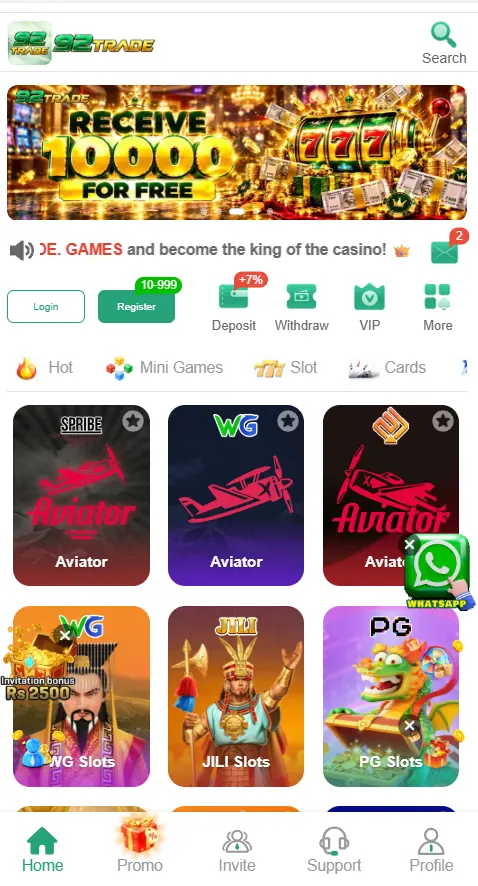
92Trade is an online gaming platform featuring different categories of digital games. Its homepage displays sections for Hot, Mini Games, Slot and Cards, allowing users to explore different gaming options.
The platform also displays account-related features such as Deposit, Withdraw, VIP, Invite and Support. Users can access registration and login options from the homepage.
The screenshots show a mobile-friendly interface with several game providers, including Spribe, WG, JILI and PG. However, the available game collection and platform features may change over time.
92Trade Game Platform Information
Here is an overview of the information visible in the supplied platform screenshots.
| Detail | Information |
|---|---|
| Platform Name | 92Trade |
| Platform Category | Online Gaming |
| Main Game Categories | Hot, Mini Games, Slot, Cards |
| Displayed Game Providers | Spribe, WG, JILI, PG |
| Registration Method | Phone Number |
| Country Code | +92 |
| Account Options | Login and Register |
| Other Features | Deposit, Withdraw, VIP, Invite, Support |
| APK Version | Not verified |
| APK Size | Not verified |
| Developer | Not verified |
The screenshots confirm the displayed interface and registration options, but they do not establish the official APK version, file size, developer or Android compatibility requirements.
Main Features of 92Trade Game
92Trade displays several features designed to help users navigate its gaming and account sections.
Multiple Game Categories
The homepage includes four visible categories: Hot, Mini Games, Slot and Cards. Users can explore these sections to find the games available under each category.
Different Game Providers
The homepage displays game tiles associated with Spribe, WG, JILI and PG. These provider labels appear alongside different gaming titles and graphics.
Account Registration and Login
The platform provides separate Login and Register options. New users can access the registration form, while existing account holders can use the login section.
Deposit and Withdrawal Options
The homepage includes separate Deposit and Withdraw buttons. The profile section also contains a Manage Withdrawal option.
The available screenshots do not show the complete transaction process, supported payment methods or withdrawal conditions. Users should check these details directly before making financial transactions.
VIP and Promotional Sections
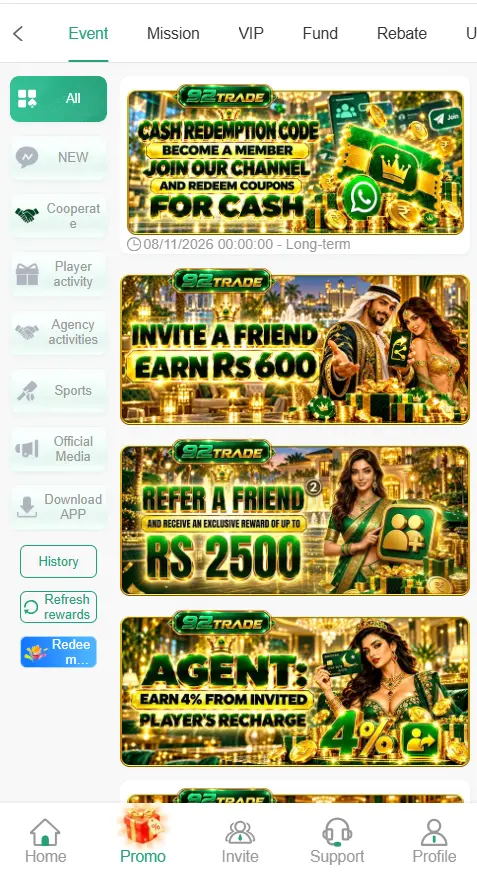
The interface includes a VIP option and a separate Promo section. Promotional banners display figures such as 10,000 for free, while other areas show percentage-based promotional labels.
These figures are platform advertisements, not confirmation of guaranteed rewards. Always read the applicable terms and conditions.
Profile and Account Management
The profile section provides several account-related options, including My Records, Manage Withdrawal, Invite, Profile, Security Center, FAQ and Login Device.
These sections help users access account information and platform support options.
Games Available on 92Trade APK
The 92Trade homepage displays several gaming categories and titles from different providers. The visible screenshots provide examples of the games and sections available on the platform.
Aviator
Aviator appears multiple times on the homepage with different provider branding, including Spribe and WG. It is a crash-style game in which a multiplier increases during a round. Players need to understand the cash-out rules and the possibility of losing their stake.
NG Slots
The homepage displays an NG Slots section with its own game artwork. Users can explore the available titles in the corresponding game section.
JILI Slots
JILI Slots appears as another category on the homepage. The provider name is displayed alongside themed game artwork.
PG Slots
PG Slots is also visible in the homepage game collection. Users can explore the titles listed under this section.
Mini Games and Cards
The platform includes separate Mini Games and Cards categories in its navigation. The screenshots do not show the complete list of titles under these categories, so the current selection should be checked directly on the platform.
How to Download 92Trade APK on Android
If you want to access 92Trade through an Android application, first check whether the platform provides a verified APK download.
Follow these general steps:
- Open your browser on an Android phone.
- Visit the verified 92Trade platform address.
- Look for the Android download option.
- Check the APK source and available file information.
- Download the file only after verifying its origin.
- Open the downloaded APK from your Downloads folder.
- Review the installation permissions before proceeding.
The supplied screenshots show the platform interface, not an APK download page. Therefore, the official download source, latest version and file size have not been confirmed.
How to Install 92Trade APK?
If you have obtained an APK from a source you trust, Android may require permission to install applications from that source.
- Open your phone’s Settings.
- Go to Apps or Security.
- Find the Install Unknown Apps option.
- Select the browser or file manager used to download the APK.
- Review the permission and enable it only if necessary.
- Open the downloaded APK file.
- Follow the installation instructions.
The names of these settings can differ between Android devices. Avoid installing applications that request unnecessary permissions.
How to Register on 92Trade Game ?
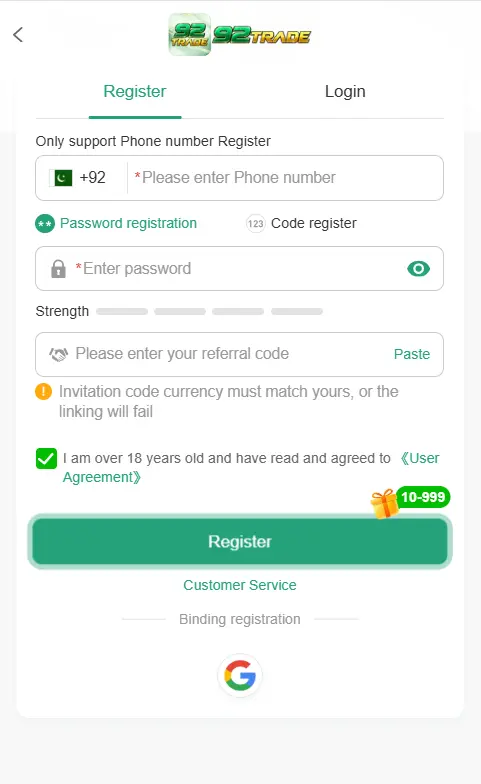
The supplied registration screenshot confirms that 92Trade provides phone-number registration with Pakistan’s +92 country code.
The registration page displays two options: Password Registration and Code Register. It also includes a password field, referral code field and an 18+ confirmation checkbox.
Follow these steps to understand the registration process:
- Open the 92Trade registration page.
- Select the Register tab.
- Enter your Pakistani phone number with the +92 country code.
- Choose Password Registration or Code Register.
- Enter the required password or verification information.
- Enter a referral code if you have a valid one.
- Read the User Agreement.
- Confirm that you meet the displayed age requirement.
- Submit the registration form if you agree with the terms.
The screenshot also displays a Google option under Binding Registration. This appears as an additional account-binding option, but its complete process is not visible.
How to Login to 92Trade Game?
Existing users can access their accounts through the Login option displayed on the homepage and registration page.
A general login process is:
- Open the verified 92Trade platform.
- Select Login.
- Enter the registered account information.
- Provide the required password or verification code.
- Follow any additional verification instructions.
- Submit the login form.
If you cannot access your account, check your details and look for an official account recovery option.
Never share your password or verification codes with another person.
Understanding the 92Trade Profile Section
The profile screenshot provides a clearer view of the account management options available on 92Trade.
My Records
The My Records section displays a description referring to details, records, reports and balance recovery. Users can explore this section to understand the account information available to them.
Manage Withdrawal
This option appears in the profile menu and is related to withdrawal management. The exact withdrawal procedure and conditions are not visible in the screenshot.
Invite
The Invite section provides access to the platform’s invitation feature. The homepage also displays an invitation-related promotional graphic.
Profile
The Profile option provides access to account-related information.
Security Center
The Security Center is listed as a separate account option. Users should review its available security settings to understand how account protection works.
FAQ and Login Device
The FAQ section provides a place to look for platform-related answers. Login Device is another visible option that appears to relate to account access devices.
92Trade Deposit and Withdrawal Information
The 92Trade homepage displays separate Deposit and Withdraw options. The profile section also includes Manage Withdrawal.
However, the supplied screenshots do not show the payment page or confirm which payment methods are supported.
Pakistani users should not assume that JazzCash, Easypaisa or bank transfers are available without checking the actual transaction page.
Before making a deposit or withdrawal, review:
- Supported payment methods.
- Minimum and maximum transaction limits.
- Applicable transaction charges.
- Account verification requirements.
- Withdrawal conditions.
- Processing times and restrictions.
Keep transaction receipts and reference numbers for your records. Never send money to payment details received through an unverified message.
92Trade Bonuses and Promotional Offers
The homepage displays promotional graphics and several reward-related sections. One banner advertises 10,000 for free, while another visible graphic mentions an invitation bonus of Rs. 2500. The interface also displays percentage-based labels near the Deposit and other account options.
Users exploring other gaming platforms, such as JAN111 Game, may also come across different promotional offers and reward claims. However, every platform has its own terms and conditions, so users should check the details before accepting an offer.
Before accepting any 92Trade promotion, check:
- Who can participate.
- Whether a deposit is required.
- Any wagering or play-through conditions.
- Reward expiry dates.
- Withdrawal restrictions.
- Other promotional terms.
Can You Use 92Trade on a PC?
The screenshots show a mobile interface and do not confirm the availability of a dedicated Windows or desktop application.
If the platform provides a compatible web version, users may be able to access it through a desktop browser.
Check the official platform for supported devices and avoid installing unofficial computer software from unfamiliar websites.
Is 92Trade Available for iOS?
An Android APK cannot be installed directly on an iPhone or iPad. Apple devices use a different application format.
The supplied screenshots do not confirm whether 92Trade provides a separate iOS application. Check the platform for an officially supported iOS option or browser-based access.
Is 92Trade Safe to Use?
A working homepage or registration form does not automatically prove that a platform is secure, licensed or independently tested.
Before installing an application or creating an account, consider these precautions:
- Verify the website address.
- Check the source of any APK file.
- Review application permissions.
- Use a unique password.
- Keep your OTP and payment PIN private.
- Read the User Agreement and privacy policy.
- Check payment and withdrawal conditions.
- Avoid sharing unnecessary personal information.
The screenshots do not establish the platform’s licensing, security certification or game fairness. These details should be independently verified.
Important Risks of Real-Money Gaming
Games involving money can result in financial losses. No game outcome or promotional offer should be treated as guaranteed income.
Set a spending limit before participating. Never use money needed for essential expenses or borrow funds to play. Check the laws that apply in your location before accessing real-money gaming services.
Advantages and Limitations of 92Trade Game
Based on the visible interface, 92Trade provides several navigation and account features.
Visible Features
- Separate Hot, Mini Games, Slot and Cards categories.
- Game listings associated with Spribe, WG, JILI and PG.
- Phone-number registration with Pakistan’s +92 code.
- Password Registration and Code Register options.
- Deposit and Withdraw sections.
- VIP, Promo and Invite options.
- Profile and Security Center sections.
Details That Still Need Verification
- Official APK version and file size.
- Developer and Android compatibility.
- Complete game catalogue.
- Supported deposit and withdrawal methods.
- Transaction limits and processing times.
- Promotional eligibility and conditions.
- Licensing and independent security information.
Frequently Asked Questions
92Trade is an online gaming platform that displays different game categories, including Hot, Mini Games, Slot and Cards.
Open the registration page, enter your Pakistani phone number with the +92 country code, choose a registration method and follow the displayed instructions.
Yes. The supplied registration screenshot displays Pakistan’s +92 country code.
The registration page displays Password Registration and Code Register options.
The homepage displays Aviator, NG Slots, JILI Slots and PG Slots, along with Hot, Mini Games, Slot and Cards categories.
Yes. The homepage displays Deposit and Withdraw options. The exact payment methods and transaction conditions need to be checked directly.
The supplied screenshots do not confirm JazzCash or Easypaisa support. Check the actual payment section before making a transaction.
The homepage displays an invitation-related promotional graphic mentioning Rs. 2500. Check the current promotional terms and eligibility conditions before relying on this offer.
The latest APK version has not been verified. Check a trusted download source for accurate version information.
The supplied screenshots do not confirm a dedicated iOS application. Check whether the platform provides an officially supported iOS or browser-based option.
Its licensing and independent security status have not been verified. Check the platform’s terms, APK source, permissions and applicable laws before using it.
Final Thoughts
92Trade displays a range of gaming categories, account management options and promotional sections. Its homepage includes Hot, Mini Games, Slot and Cards, while the profile section provides options such as My Records, Manage Withdrawal, Invite and Security Center.
The registration page supports Pakistani phone numbers with the +92 country code and provides Password Registration and Code Register options.
Before downloading an APK, creating an account or making a payment, verify the source and review the platform’s current terms. Keep your account details private and remember that real-money gaming involves financial risks.
Download links
How to install 92Trade Game APK Download – Complete Guide for Pakistani Users APK?
1. Tap the downloaded 92Trade Game APK Download – Complete Guide for Pakistani Users APK file.
2. Touch install.
3. Follow the steps on the screen.