
JAN111 Game APK Download – Explore Online Gaming in Pakistan
Today
18MB
1.2
Android5+
6000+
Description
JAN111 Game is a name that Pakistani users may come across when searching for mobile gaming and online entertainment platforms. People searching for JAN111 Game usually want to know how to download the APK, install it on Android, create an account, access available games, and understand its payment and reward features.
Before downloading an unfamiliar gaming application, however, it is worth checking the source and application details. Different third-party websites currently display different JAN111 APK versions, file sizes, and Android requirements. These details have not been independently confirmed as the official release information.
This guide explains what to check before installing JAN111 Game, how Android APK installation works, and what users should understand about registration, login, promotions, and financial transactions.
What Is JAN111 Game?
JAN111 Game is presented on third-party download websites as a mobile gaming platform. These listings associate the name with Android access, account registration, login options, and different types of online games.
However, users should identify the exact JAN111 website or application before treating these descriptions as confirmed features. Similar names, copied download pages, and unofficial APK files can make it difficult to identify the genuine service.
If you are interested in exploring JAN111 Game, first check its website address, developer information, privacy policy, terms of service, and available support details. These checks can help you understand who operates the service and what information it provides.
The actual games, account options, and other features should be confirmed through the platform itself rather than assumed from third-party descriptions.
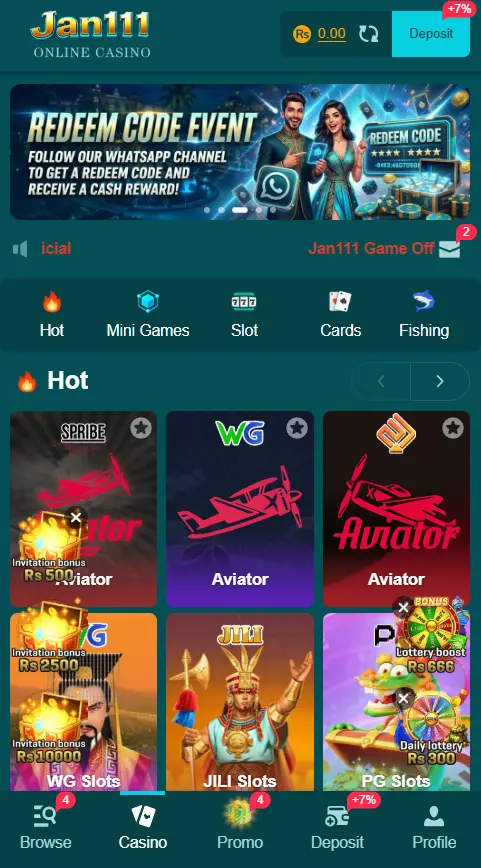
JAN111 Game APK Information
An APK is an Android application package. It contains the files required to install an application on an Android device.
People searching for JAN111 Game APK may prefer installing an application instead of accessing a service through a mobile browser. However, an APK file should be checked carefully before installation.
The following table separates information found on third-party listings from details that still need verification.
| APK detail | Available information |
|---|---|
| App name | JAN111 Game |
| Application format | APK listings are available |
| Developer | Not independently verified |
| Latest official version | Not confirmed |
| File size | Different listings report different sizes |
| Minimum Android version | Not officially confirmed |
| iOS version | Not verified |
| Official download source | Requires confirmation |
Some third-party pages list versions such as 1.1.77, 1.1.0, 3.2.1, and 2.1.76. Their reported file sizes also differ. These figures should not be treated as proof of the latest official JAN111 release.
Before downloading, compare the application details with information provided by a verified source. Avoid modified APK files or websites that make unrealistic promises about rewards.
How to Download JAN111 Game APK on Android
If you find a JAN111 APK download page, check the source before saving the file to your phone. A download button alone does not establish that an application is genuine.
Follow these steps when a verified APK source is available:
- Open the website associated with the actual JAN111 service.
- Check the application name and developer information.
- Review the available version, file size, and Android compatibility details.
- Read the application’s requested permissions.
- Download the file only if you trust its source.
- Scan the downloaded APK using a reputable security tool.
- Keep the file in your phone’s Downloads folder until you are ready to install it.
If you cannot confirm where the APK comes from, avoid installing it or entering personal information.
How to Install JAN111 Game on an Android Phone
Android may restrict applications installed from sources outside recognised app stores. This is why some APK installations require permission for a particular browser or file manager to install applications.
If you have verified the APK source, use this general installation process:
- Open the Downloads folder on your Android phone.
- Locate the JAN111 APK file.
- Tap the file to begin installation.
- If Android displays a security prompt, review the source requesting installation permission.
- Allow the installation only if you trust the file and its source.
- Follow the instructions displayed on your screen.
- Open the application after installation and review its basic settings.
Android menus can differ between phone brands. You should also disable the temporary installation permission after completing the process if you no longer need it.
If installation fails, check whether the file downloaded completely, whether your device has enough storage, and whether the APK is compatible with your Android version.
JAN111 Game Features
The features associated with JAN111 Game should be checked through its verified website or application. Third-party descriptions alone cannot confirm that every advertised option is available.
Here are some areas worth checking before using the platform.
Mobile Access
Users searching for JAN111 Game may be interested in accessing the service through an Android smartphone. If a genuine mobile application is available, check its compatibility and installation requirements before using it.
Game Selection
Different third-party listings associate JAN111 with multiple gaming formats. However, the exact game catalogue has not been independently verified.
Open the relevant game section, read the instructions, and check the rules before participating. Game availability may also change between versions.
Account Management
Account-based platforms may provide registration, login, and profile settings. Check which personal details are required and whether the service provides account recovery options.
Promotions and Rewards
Some third-party pages advertise welcome offers, daily rewards, and referral promotions. Their availability and conditions should be confirmed directly through the platform.
A promotional amount should not automatically be treated as withdrawable cash or guaranteed income.
Customer Support
Before creating an account, check whether JAN111 provides a genuine support channel. Use contact details displayed by the verified service rather than relying on unknown social media accounts or individuals.
Games Available on JAN111 Game
Game variety is an important consideration for people exploring an online gaming platform. Some third-party JAN111 listings mention categories such as slots, card games, colour prediction, fishing games, and other casino-style activities. Users exploring similar platforms, such as 1777PKR Game, may also be interested in comparing the available gaming options and overall experience.
However, these descriptions are not sufficient to confirm the current JAN111 game catalogue. The actual selection should be checked inside the verified service.
Before opening any game, understand its rules, participation requirements, and whether it involves real-money activity. Different games have different mechanics and financial risks.
Do not assume that a game offers guaranteed rewards or that its results can be predicted through a particular strategy.
How to Register on JAN111 Game
The exact JAN111 registration procedure has not been independently confirmed. If a verified registration page is available, follow the instructions shown there.
A typical account creation process may involve:
- Open the verified JAN111 website or application.
- Find the Register or Sign Up option.
- Enter the information requested by the platform.
- Create a strong and unique password.
- Complete any required verification.
- Read the privacy policy and account terms.
- Submit the form only if you understand and accept the conditions.
Do not provide unnecessary personal information. If the platform requests your phone number or email address, check how it uses and protects that information.
Never share your password, mobile wallet PIN, or one-time password (OTP) with another person.
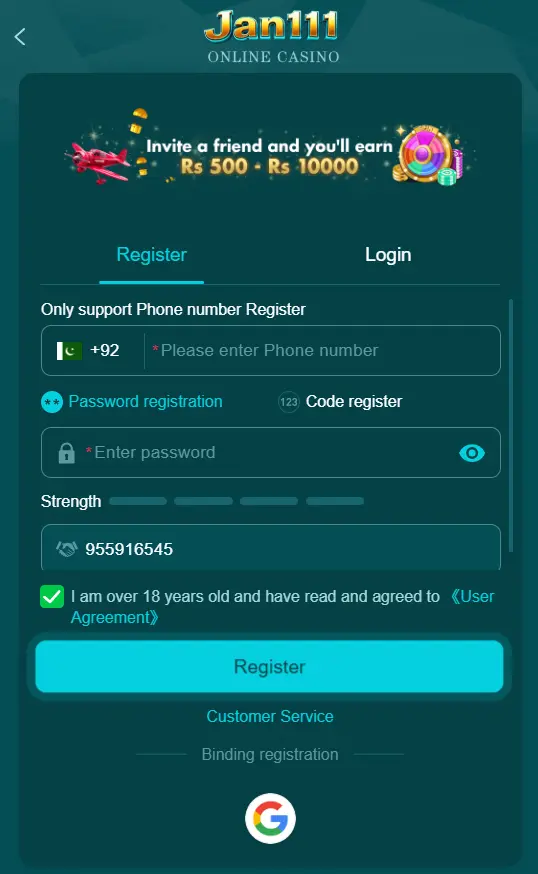
JAN111 Game Login Guide
Existing users should access their accounts through the verified JAN111 website or application.
The general login process may include these steps:
- Open the correct platform.
- Select the Login option.
- Enter your registered username, phone number, or other requested account detail.
- Type your password.
- Complete any required security verification.
- Continue to your account if the information is accepted.
If you cannot log in, check your internet connection and account details. Use the platform’s official password recovery option if one is available.
Avoid websites or people claiming they can recover your account in exchange for your password or verification code.
JAN111 Game Deposits and Withdrawals
Payment information deserves careful attention, especially when a gaming service involves real money.
Some third-party JAN111 pages mention local payment options, including JazzCash and Easypaisa. However, I could not independently confirm that these methods are currently supported by the actual JAN111 service.
If the verified platform provides deposit or withdrawal facilities, review the following details before making a transaction:
- Supported payment methods
- Minimum and maximum transaction limits
- Applicable service charges
- Deposit and withdrawal requirements
- Processing times
- Account verification rules
- Withdrawal restrictions
- Refund and dispute procedures
Never send money to a personal account simply because someone claims to represent JAN111 support. Use only payment instructions displayed through a verified service, and keep transaction references for your records.
Remember that real-money gaming can result in financial losses. Do not borrow money, chase losses, or spend funds needed for essential expenses.
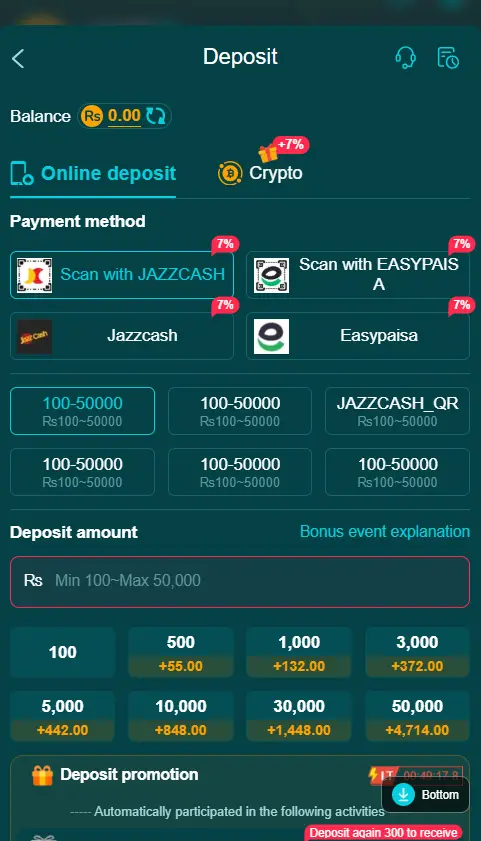
JAN111 Game Bonuses and Promotions
Promotional offers may attract users who are exploring a gaming platform. Some third-party JAN111 descriptions mention welcome rewards, daily activities, and referral offers.
However, I could not confirm the current availability or terms of these promotions.
Before accepting an offer, check:
- Whether the promotion is currently active
- Who can participate
- Whether registration or a deposit is required
- Whether the offer has an expiry date
- Whether additional playing conditions apply
- Whether the reward can be withdrawn
- Whether any restrictions apply to specific games
Read the complete promotion terms instead of relying on the advertised amount. A bonus does not guarantee winnings, profit, or a successful withdrawal.

Is JAN111 Game Safe to Download?
The safety of an APK depends on its actual source, developer, contents, and requested permissions. A familiar application name or attractive download page does not prove that a file is safe.
Before installing JAN111 Game, consider these precautions:
Verify the source: Check the exact website address and developer details. Avoid unknown download links and modified application files.
Review permissions: Check whether the application requests access that makes sense for its purpose. Be cautious about unnecessary access to contacts, messages, files, or other personal information.
Scan the APK: Use reputable security tools to examine the installation file. Remember that a security scan cannot guarantee complete protection.
Protect account details: Use a unique password and never share your OTP, wallet PIN, or login information.
Read the policies: Understand the privacy policy, terms of service, account restrictions, and transaction conditions before sharing personal or financial information.
Check applicable rules: If the service involves betting or gambling, understand the financial risks and check applicable laws in Pakistan before participating.
If you cannot establish the application’s source or identify its operator, the safer decision is not to install it.
JAN111 Game for iPhone and PC
Can You Use JAN111 Game on iPhone?
An APK is designed for Android and cannot be installed directly on an iPhone.
I could not verify an official JAN111 iOS application. If you use an iPhone, check whether the actual service provides a legitimate iOS app or a compatible browser-based version.
Avoid downloading unfamiliar configuration profiles or software that claims to convert Android APK files into iPhone applications.
Can You Use JAN111 Game on a PC?
I could not confirm an official Windows or desktop version of JAN111 Game.
If the verified service offers a browser-based option, check its requirements before accessing it on a computer. Android emulators are another general way to run some Android applications on a PC, but compatibility and security are not guaranteed.
Do not install unknown emulator packages or APK files just to access an unverified platform.
Common JAN111 Game Problems and Possible Solutions
Users exploring unfamiliar applications may encounter installation, login, or connectivity issues. The following general checks can help identify common problems.
| Problem | What to check |
|---|---|
| APK not installing | File integrity, storage space, and device compatibility |
| App not opening | Android compatibility and application updates |
| Login not working | Account details and internet connection |
| Verification issue | Correct phone number or email and official support |
| Slow loading | Internet connection and device performance |
| Payment not showing | Transaction reference and official support channel |
If a problem involves money or account access, contact the verified platform through its official support channel. Do not share sensitive account information with strangers offering technical assistance.
Our Review of JAN111 Game
JAN111 Game appears in search results as a mobile gaming platform aimed at users interested in Android gaming and account-based features.
However, important details remain unclear. Third-party websites report conflicting APK specifications, and claims about game availability, payment methods, bonuses, and withdrawals have not been independently confirmed.
For this reason, it would be premature to describe JAN111 as a verified or reliable earning platform. Users should first establish the genuine application source, identify its operator, and review its policies.
The most sensible approach is to treat the platform cautiously until reliable information becomes available. Avoid making financial decisions based on promotional descriptions or promises of easy earnings.
Frequently Asked Questions
JAN111 Game is a name associated with third-party listings for an online mobile gaming platform. Users should verify the exact service and its features before creating an account.
First, identify a trustworthy source associated with the actual service. Check the developer, APK version, file size, compatibility, and permissions before downloading or installing it.
There is no independently confirmed latest official version available from the sources reviewed. Third-party listings report different version numbers, so verify the release through the actual developer.
Third-party websites advertise an Android APK. However, users should confirm the genuine application source and device requirements before installation.
An Android APK cannot be installed directly on an iPhone. I could not verify an official JAN111 iOS application.
Some third-party websites mention these payment services, but current support has not been independently confirmed. Check the payment options displayed by the verified platform.
No gaming platform should be treated as a source of guaranteed income. Real-money games can involve financial losses, and promotional rewards may have conditions.
Safety cannot be confirmed from the application name alone. Verify the source, developer, permissions, and policies before installing an APK.
Final Verdict
JAN111 Game is a search term associated with mobile gaming and APK download listings in Pakistan. Users interested in the platform may want to explore its Android access, account options, games, and payment facilities.
However, the available third-party information contains inconsistencies, particularly regarding APK versions and file sizes. Important details about the official developer, current features, and payment support also require verification.
Before downloading JAN111 Game, confirm the source and review the application carefully. Protect your personal information, understand the rules, and avoid financial commitments based on unverified promises.
Making an informed decision is more important than rushing to install an unfamiliar application.
Download links
How to install JAN111 Game APK Download – Explore Online Gaming in Pakistan APK?
1. Tap the downloaded JAN111 Game APK Download – Explore Online Gaming in Pakistan APK file.
2. Touch install.
3. Follow the steps on the screen.